Phishing sites do not stay dangerous for long because they are well built. They stay dangerous because they stay online. A convincing fake login page that gets removed in an hour does limited damage. The same page left up for a week or two can quietly drain customer trust, credentials, and revenue.
According to Bolster AI’s 2026 Fraud Trends and Prediction Report, one in four phishing victims engages with a scam within 24 hours of it going live, and 15% of customers who fall for a scam never return to the brand that was impersonated. Speed is not a nice-to-have in a phishing site takedown. That’s the entire point.
This guide walks through what a phishing site takedown actually is, how the process works step by step from detection to removal, how to report and take down a phishing site yourself, and why most manual takedown attempts move too slowly to matter. We will also cover what automated takedown changes, what to look for in a takedown provider, and the questions security and brand protection teams ask most often.
What Is a Phishing Site Takedown?
A phishing site takedown is the process of getting a malicious website that impersonates a brand, a login page, or a trusted service removed from the internet. In practice, that usually means convincing a hosting provider, domain registrar, content delivery network, or platform to disable the site, suspend the domain, or pull the offending content.
It helps to separate three terms that often get used interchangeably:
- Detection or monitoring is finding the fraudulent site in the first place, whether through automated scanning, threat intelligence feeds, or a customer report.
- Takedown is the act of getting that site disabled or removed once it has been confirmed malicious.
- Blocklisting is the separate step of submitting the confirmed URL to browser and security blocklists so users are warned even before the underlying site is fully removed.
These are sequential stages of one larger workflow, which we walk through in detail later in this guide. A strong phishing and scam protection program treats all three as connected, not as isolated tasks handled by different teams on different timelines.
Why Phishing Site Takedowns Matter
The cost of a live phishing site is not abstract. It shows up in a handful of concrete ways.
Direct financial loss. Every minute a credential harvesting page or fake checkout flow stays live, more customers enter real data into it. That data gets used for account takeover, fraudulent transactions, or resold on dark web marketplaces.
Brand trust erosion. Bolster AI’s research found that 72% of impersonation sites mimic a full customer journey, from login through checkout to support chat, not just a single fake page. The more convincing the experience, the harder it is for customers to tell they were scammed, and the more damage it does to trust when they find out. That’s the same churn cost described above, compounding the longer the site stays convincing.
Regulatory exposure. In financial services and other regulated industries, organizations are increasingly expected to show they are actively monitoring for and acting on impersonation attempts targeting their customers. A documented takedown process is part of that evidence.
Operational drag. Every unresolved phishing site generates support tickets, security investigations, and internal back and forth about who owns the response. That overhead grows with every hour a site stays live.
A phishing site is also rarely the whole story. The same campaign often runs in parallel across social media, paid ad networks (a page we’re building out further), and app stores, so a takedown program that only watches for websites is only watching part of the attack.
All four of these costs are time sensitive. The longer a phishing site exists, the more they compound. That is why the rest of this guide focuses less on whether to take a site down and more on how to do it fast.
How Phishing Sites Get Created (and Why They Are Hard to Catch)
Understanding how attackers build phishing infrastructure makes it easier to understand why takedown has to be fast and continuous, not occasional.
- Typosquatting and homoglyphs. Attackers register domains that look almost identical to a real brand’s, swapping letters for lookalike characters or numbers, or registering common misspellings. A user who mistypes a URL, or glances quickly at a link, often cannot tell the difference. Typosquatting protection is its own discipline for this reason.
- Cloned branding and UI. Modern phishing kits copy logos, color schemes, and entire page layouts almost pixel for pixel, often pulling assets directly from the real site.
- AI-generated cloned journeys. Rather than a single fake page, attackers increasingly build out a full simulated customer journey (login, two-factor prompt, support chat) to keep victims engaged longer and extract more information. That cloned journey rarely stops at the phishing site itself: the same campaign often extends into fake social media profiles, paid ad networks (a page we’re building out further), and fraudulent app store listings, so the website is only one piece of what the victim actually experiences.
- Cloaking and proxies. Sites are frequently hosted behind proxies, CDNs, or rotating infrastructure specifically to obscure the true hosting origin and make automated detection harder.
- Rapid domain rotation. Because domains are cheap and disposable, attackers often register dozens of near identical domains at once and rotate through them as each one gets reported or blocked.
Most of this infrastructure is built using automated phishing as a service kits, which means a single attacker can spin up hundreds of variants in a short period. Manual, one off detection methods were never designed to keep pace with that volume.
The Phishing Site Takedown Process: A Step by Step Breakdown
Whether a takedown is handled manually or by an automated platform, it generally moves through the same six stages. Understanding each one makes it much easier to evaluate any tool, vendor, or internal process against it.
| Stage | What Happens | Why It Matters |
| 1. Detection | A suspicious site is identified, through monitoring tools, threat feeds, abuse mailbox reports, or customer complaints. | You cannot take down what you have not found. Coverage gaps here delay everything downstream. |
| 2. Validation | The site is confirmed as actually malicious, not a false positive, using visual, structural, and behavioral analysis. | Sending takedown requests for legitimate sites burns credibility with hosts and registrars. |
| 3. Evidence Collection | Screenshots, WHOIS data, hosting information, and redirect chains are gathered to support the takedown request. | Hosting providers and registrars act faster on requests backed by clear, specific evidence. |
| 4. Escalation | The takedown request is submitted to the correct party, which could be the hosting provider, registrar, CDN, or platform. | Sending a request to the wrong party (for example, the registrar instead of the host) wastes time. |
| 5. Removal | The site is disabled, suspended, or otherwise taken offline. | This is the visible outcome, but it is only the midpoint of the process, not the end. |
| 6. Blocklist Submission and Monitoring | The confirmed URL is pushed to global blocklists, and the underlying infrastructure is monitored for reappearance. | Attackers frequently rebuild on a new domain. Monitoring catches the second attempt before it scales. |
This is the same general framework used across the takedown industry, and it is worth keeping in mind as a checklist. A provider or process that stops at stage five, removal, without doing stage six is only solving half the problem.
How to Report and Take Down a Phishing Site Yourself
If you do not yet have a dedicated takedown service in place, you can still report and request removal of a phishing site directly. Here is the general process.
- Confirm it is actually phishing. Before reporting anything, verify the site is malicious rather than, say, a legitimate competitor or a third party using your brand name fairly. A free tool like CheckPhish can scan a suspicious URL and flag known phishing or typosquatting indicators in seconds.
- Look up who hosts and who registered the domain. A WHOIS lookup will usually show the domain registrar. Separately, tools like a reverse IP lookup or simply checking the site’s SSL certificate or server response headers can help identify the actual hosting provider, which is often different from the registrar.
- Find the right abuse contact. Most registrars and hosting providers publish an abuse email address (commonly something like [email protected]) specifically for reports like this. Sending a report to the wrong address, such as general customer support, slows everything down.
- Submit a report with clear evidence. Include the exact URL, screenshots of the phishing content, the brand or organization being impersonated, and, if relevant, the date you first observed it. Vague reports get deprioritized.
- Report to blocklists directly. Independent of waiting for the host to act, you can submit the URL to Google Safe Browsing and other public blocklists so that browsers begin warning visitors immediately.
- Decide whether a formal legal process is needed. For more complex or contested cases, two formal mechanisms exist, summarized below.
| DMCA Takedown | UDRP Takedown | |
| What it targets | Copyright infringement (stolen logos, images, or content) | Domain name disputes, including cybersquatting |
| Who handles it | Hosting provider or platform, based on a copyright claim | ICANN approved dispute resolution providers |
| Speed | Can be relatively fast if self-filed correctly, but is mostly a manual, self-service process | Often slow, resolved through agreement, arbitration, or court action |
| Best suited for | Sites using your exact copyrighted assets | Disputing ownership of a confusingly similar domain name, sometimes before it is even weaponized |
| Main drawback | Requires registration, documentation, and ongoing maintenance on your part | Requires filing in the correct jurisdiction, which gets complicated with prolific or repeat offenders |
Both routes work, but neither was designed for speed. That brings us to the core problem with relying on manual takedown alone.
Why DIY Takedowns Are Often Too Slow
The steps above are accurate, and they work. The problem is timing. Without established relationships with major hosting providers and registrars, fraudulent site removals take an average of 10 to 12 days industry wide.
The chart below shows just how large that gap is compared to an automated process with direct provider integrations.
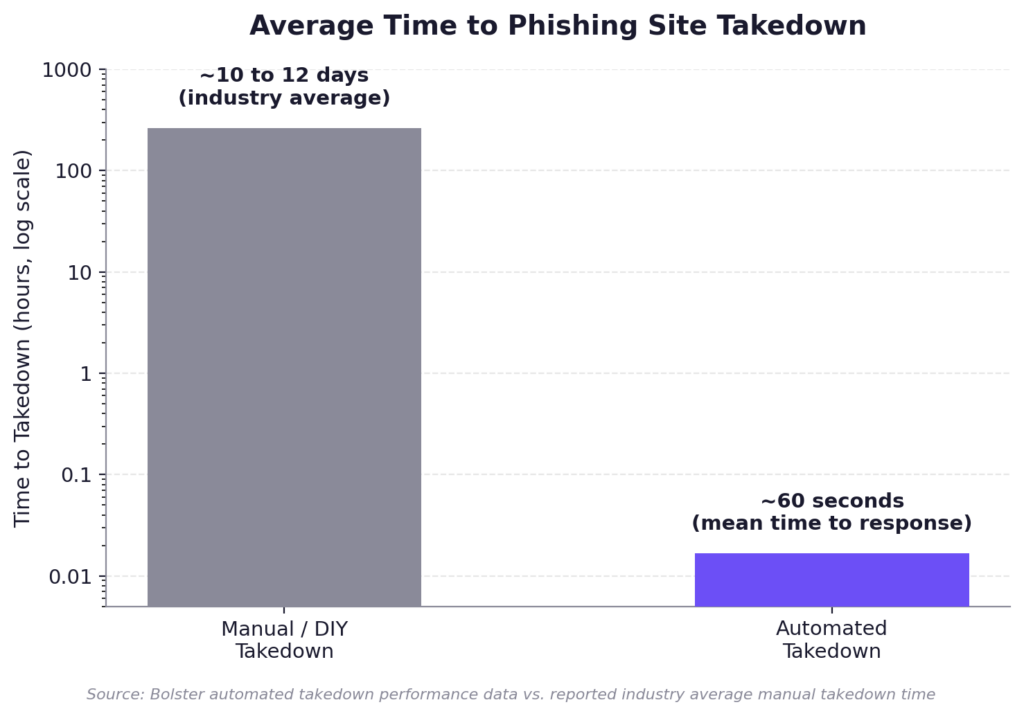
Average time to phishing site takedown: industry average of 10 to 12 days for manual takedown versus roughly 60 seconds for automated takedown.
A handful of factors typically explain the delay:
- Jurisdiction. A host or registrar based in a different country may operate on a different timeline, language, or legal standard.
- Manual verification. Abuse teams at hosting providers often review reports by hand, which means your request sits in a queue alongside everyone else’s.
- Incomplete evidence. Reports that are missing screenshots, clear URLs, or context get bounced back for clarification, adding another full round trip.
- No existing relationship. Providers who have worked with a given reporter or platform before, and trust their evidence, tend to act faster than they do for an unfamiliar one off report.
None of this means manual reporting is pointless. It’s often the right move for a one-off incident. But for any organization dealing with phishing on an ongoing basis, the math doesn’t hold up. Ten to twelve days is long enough for a scam to reach far more victims than a fast takedown would allow, and 15% of everyone who falls for it will never return to the brand being impersonated. Shrinking that window is what automation is built to do.
Automated Phishing Site Takedown: How AI Speeds Up the Process
Automated takedown does not skip any of the six stages outlined earlier. What changes is how fast each one moves, largely because of two structural differences from manual reporting.
Direct API integrations. Rather than emailing an abuse address and waiting in a queue, automated platforms connect directly to major registrars, hosting providers, and CDNs through APIs, so a validated takedown request can be submitted and actioned automatically, with a person stepping in only if a case gets escalated, not as a standard part of every takedown.
AI assisted evidence and correspondence. Large language models can package evidence, draft and respond to correspondence with hosting providers, and handle the back and forth that often slows manual reports down, all without waiting on a person to be available.
The result, based on Bolster AI’s own platform data, looks like this:
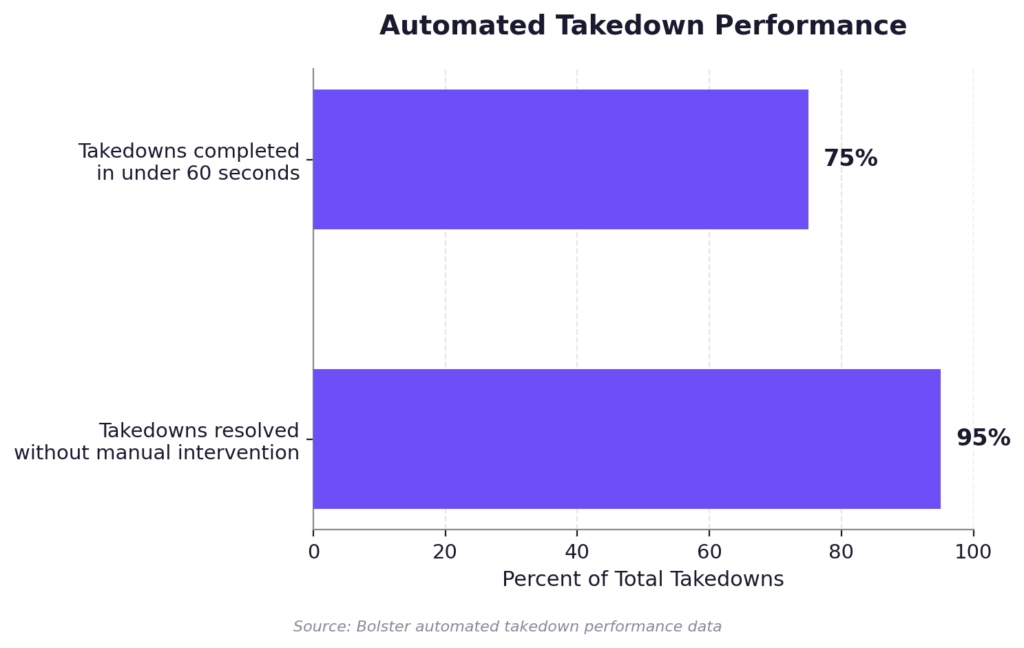
Automated takedown performance: 75% of takedowns completed in under 60 seconds, 95% resolved without manual intervention.
In concrete terms, that means a mean time to response of around 60 seconds, with 75% of takedowns completed in under a minute and 95% requiring no manual intervention at all. Confirmed malicious URLs are also submitted to global blocklists in as little as 6.5 seconds, so browsers can start warning users before the underlying site is even fully removed. The Automated Takedown platform also continues monitoring after a site is removed, specifically to catch the rebuild attempts covered in the next section.
What to Look for in a Phishing Site Takedown Service
If you are evaluating whether to bring in a takedown provider, the following checklist covers the factors that actually separate strong providers from weak ones.
| What to Evaluate | Why It Matters |
| Speed / mean time to response | Ask specifically what percentage of takedowns are automated versus manually handled, not just an average. |
| Registrar and hosting relationships | Global reach matters. A provider with strong US relationships but weak coverage elsewhere will struggle with offshore hosting. |
| Accuracy and false positive rate | A provider that flags legitimate sites as malicious damages your credibility with hosts over time. |
| Ability to handle obfuscated sites | Confirm the provider can detect and act on sites hidden behind proxies, cloud services, or rotating infrastructure. |
| Post-takedown monitoring | A site that is removed but not monitored often reappears under a new domain within days. |
| Reporting and audit readiness | For compliance and leadership reporting, you need clear, exportable evidence of what was found, when, and how it was resolved. |
For a broader look at how different phishing detection and takedown platforms compare, see our roundup of the 8 best AI phishing scam detection platforms, or our specific comparison of ZeroFox alternatives if that is one of the providers on your shortlist. A digital risk protection program that includes takedown as one piece of a broader monitoring strategy tends to outperform point solutions focused on takedown alone.
Common Challenges in Phishing Site Takedown
Even with a strong process or provider in place, a few recurring challenges are worth planning for.
Sites hidden behind proxies or CDNs: Some phishing infrastructure is specifically configured to obscure its true hosting origin, which can slow down or block a takedown request sent to the wrong party. This requires detection methods built to see through cloaking, not just standard scanning.
Jurisdictional gaps: Hosting providers and registrars in certain regions respond inconsistently, or not at all, to standard abuse reports. Established relationships and escalation paths matter far more in these cases than evidence quality alone.
Recurrence: Removing a site does not remove the attacker. The same actor frequently rebuilds under a new domain within days, sometimes reusing the same page templates, hosting setup, or contact details. Continuous monitoring after a takedown is what catches this before it scales again.
Connected campaigns: A phishing site is rarely the entire campaign. It is often paired with phishing emails, fake social media profiles, or fraudulent ads driving traffic to it. Treating the website as an isolated problem, rather than one piece of a coordinated attack, leaves the rest of the infrastructure standing.
How Bolster AI Approaches Phishing Site Takedown
Bolster AI’s takedown platform is built around the same six stage process outlined above, with automation applied at every stage where it is possible to remove a human bottleneck. Detection runs continuously across domains, social media, app stores, and the dark web. Validated threats are escalated through direct API integrations with major registrars and hosting providers, supported by AI that drafts and manages correspondence when more back and forth is required. Confirmed malicious URLs are pushed to global blocklists within seconds, and every removed site is monitored afterward specifically to catch recurrence before it turns into a second campaign.
The result is 75% of takedowns take under 60 seconds, with 95% of takedowns completed without manual intervention, compared to a reported industry average of 10 to 12 days for manual processes.
If you want to see how this works against your own brand’s exposure, you download the Impersonation Takedown Website Guide for a closer look at how the process works end to end.
Conclusion
A phishing site takedown is not a single action. It is a process with six distinct stages, and the speed of that process determines how much damage a fraudulent site does before it is gone. Manual reporting works, and every security team should know how to do it, but it was never built to keep pace with how quickly modern phishing infrastructure gets created and rotated. Closing the gap between detection and removal, and watching for recurrence afterward, is what separates a takedown program that actually protects customers from one that is only reacting to the last incident.
Ready to see how fast your organization could be detecting and removing phishing sites? Request a demo to find out.
Frequently Asked Questions
How do I report a phishing website?
Follow the self-service process covered earlier in this guide: confirm the site is actually phishing, look up the host and registrar, find the correct abuse contact, and submit a report with clear evidence. If a formal legal route is needed, DMCA and UDRP are the two most common mechanisms, also covered above.
How fast can a phishing site actually be taken down?
It depends heavily on the method. Manual reporting through a hosting provider’s standard abuse process typically takes anywhere from a few hours to the reported industry average of 10 to 12 days. Automated platforms with direct registrar and hosting integrations can resolve a large share of takedowns in under 60 seconds.
Is reporting and taking down a phishing site free?
Reporting a phishing site directly to a hosting provider, registrar, or blocklist like Google Safe Browsing is free. Formal legal routes like DMCA or UDRP filings may involve fees if you use a dispute resolution broker or attorney. Dedicated takedown services are typically paid, but offer significantly faster and more consistent results.
What is the difference between a DMCA takedown and a UDRP takedown?
A DMCA takedown addresses copyright infringement, such as a phishing site using your stolen logo or images, and is generally handled directly with the hosting provider. A UDRP takedown addresses disputes over the domain name itself, including cybersquatting, and is resolved through ICANN approved arbitration, which tends to be slower and more procedural.
Can a takedown service remove sites hosted behind proxies or cloud services?
Yes, provided the service uses detection methods built to see through cloaking and proxy infrastructure. Not all providers can reliably identify the true hosting origin in these cases, so this is worth confirming directly when evaluating a vendor.
Do phishing sites come back after they are taken down?
Often, yes. Attackers frequently rebuild the same scam on a new domain shortly after a takedown, sometimes reusing the same templates or infrastructure. This is why ongoing monitoring after removal matters as much as the initial takedown.
Do takedown services work with hosting providers and registrars worldwide?
The strongest ones do. Coverage varies significantly between providers, so it is worth confirming a vendor’s actual relationships and historical performance in the regions most relevant to your threat landscape, rather than assuming global coverage by default.