Dark Web Dashboard
The Dark Web Dashboard gives your security team visibility into threats that originate beyond the surface web, on the deep web and on criminal marketplaces. As a proactive dark web monitoring solution, it delivers a real-time snapshot of how your enterprise is targeted, referenced, or exposed on dark web sources, helping you maintain continuous monitoring to stay ahead of emerging cyber risks.
For example, you might notice a spike in exposed credentials and stolen personal information linked to your domain. The monitoring dashboard directs you straight to the relevant findings where you can review the associated breach data, including the source. From there, your team can decide what action to take, such as forcing password resets or mitigating account takeover risks. The sooner you act on these real-time alerts, the more you limit potential impact from targeted cyberattacks and data theft.
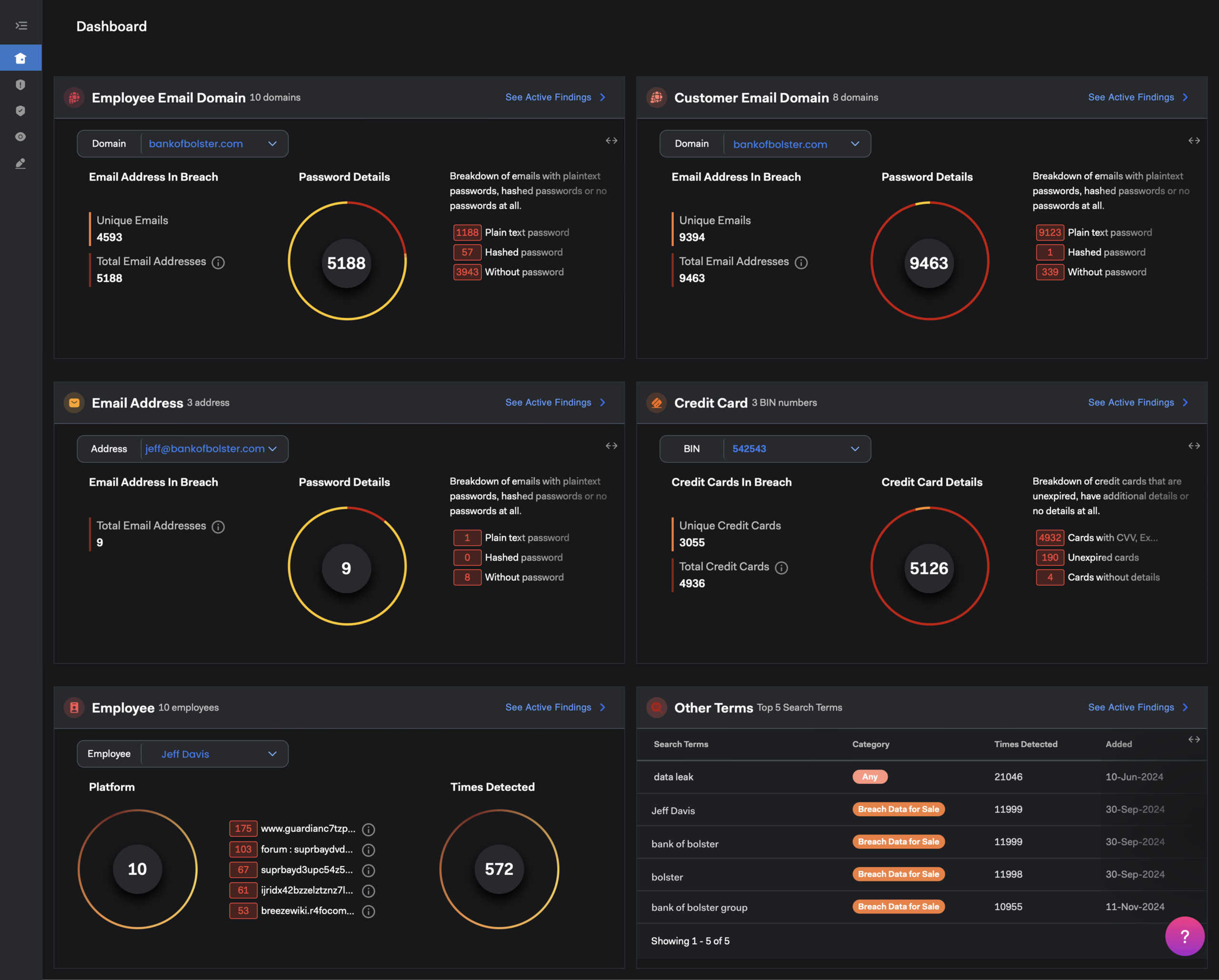
How Dark Web Monitoring Dashboard Widgets Work
Each widget in the dark web monitoring dashboard displays a snapshot of current cybersecurity metrics for specific identity entities, such as email domains for employees and customers, email addresses, employee names, or credit card BINs. Use these dark web monitoring tools and features to review data findings by type and investigate any area showing unusual dark web activity.
To expand a widget and see more detail:
- Select the double arrow toggle in the upper right corner.
To trace where data came from:
- Select the info icon next to the dark web threat intelligence data source name.
To view all associated findings for that entity:
- Select See Active Findings to go to a prefiltered list.
- For more, see Managing Dark Web Findings.
To filter by a different entity value:
- Select a new value from the dropdown at the top of the widget.
Dark Web Monitoring Workflows & Threat Detection
The dark web dashboard helps your cybersecurity team respond quickly when high-risk sensitive information appears on the dark web. Here are a few sample workflows that show how dark web monitoring services work to identify, prioritize, and neutralize cyber threats.
Preventing Internal Account Compromise with Dark Web Scans
Use the Employee Email Domain widget to spot exposed employee email addresses or login credentials.
- Set the Domain dropdown to the domain name your company’s employees use most (e.g., @yourdomain.com).
- Look for a spike in the Password Details metric, especially the Plain text password data.
- Select See Active Findings to view exposed account information.
- Check breach details to confirm exposure source, malware involvement, and exposure date.
- Share findings with security teams to reset passwords, mitigate cybercrime risks, and investigate activity on those accounts.
Customer Identity Protection & Account Exposure
Use the Customer Email Domain widget to monitor compromised third-party email addresses linked to your brand.
- Set the Domain dropdown to the domain name your customers use most (e.g., @gmail.com).
- Look for a spike in the Total Email Addresses metric.
- Select See Active Findings to view associated identifiable information records.
- Determine whether exposed accounts map to your customer base for identity theft prevention.
- Notify affected users or flag accounts for enhanced login monitoring.
Monitoring Stolen Credit Card BINs & Fraudulent Data
Use the Credit Card widget to track exposed BIN (Bank Identification Numbers).
- Use the BIN dropdown to choose a BIN associated with your issuing bank or payment processor.
- Select See Active Findings to view cards recently listed for sale on illicit dark web marketplaces.
- Filter by Discovery Date range to catch fresh data listings quickly.
- Export findings and send them to your fraud operations team for follow-up.
- Trigger the reissue or freeze procedures you have in place to prevent data theft and cyber attacks.
Executive Doxing & Threat Intelligence Mitigation
Use the Employee widget to check for doxing or targeted information leaks about your C-suite executives.
- In the Employee dropdown, select one of the search terms already added.
- Look for a spike in Times Detected by our dark web monitoring engine.
- Select See Active Findings to view the related leaks and any threat actor involvement.
- Click through a content hyperlink to examine post content or linked sources.
- Determine if the finding is malicious, suspicious, or a false positive and follow appropriate risk procedures.
Top 5 Search Terms for Proactive Threat Hunting
Use the Other Terms widget to find the most widespread current dark web threats.
- Monitor the list of the five leaks with the most detections for changes in the threat landscape.
- Select See Active Findings to view the latest dark web activity leaks that require review or action.
- Filter by Discovery Date range to prioritize fresh cyber threat intelligence findings.
FAQs & Business Benefits
Enterprise dark web monitoring works by continuously collecting data from restricted forums, criminal marketplaces, paste sites, and credential dumps circulating in the underground economy. That data is matched against the entities you monitor, such as corporate email domains, executive names, and payment BINs. When a match is found, real-time alerts notify your security team so they can respond before the exposure is used in targeted attacks such as ransomware deployment or corporate identity theft.
Key business benefits include proactive threat detection, integration into existing security workflows, and earlier warning of exposures you would otherwise learn about from a customer or a regulator. By maintaining continuous monitoring over underground forums and marketplaces, organizations gain actionable insight into emerging risks. Dark web monitoring reduces response times, protects executive identity, and strengthens overall cybersecurity defenses across the unindexed internet.